

Somebody in nearly every batch asks me this in the first week: "Sir, UI and UX, isn't that just the same thing said twice?" I get why it looks that way from the outside. The two words show up glued together on every job posting - "UI/UX Designer" - like they're one role wearing a slash. They're not. They're two different jobs that happen to need each other badly.
If you're trying to figure out which one fits you, or you're confused about what to even study before joining a UI/UX design course, this is the one explanation I'd actually want you to read before anything else. No jargon dump, just the real difference, in plain language.
The One-Line Version First
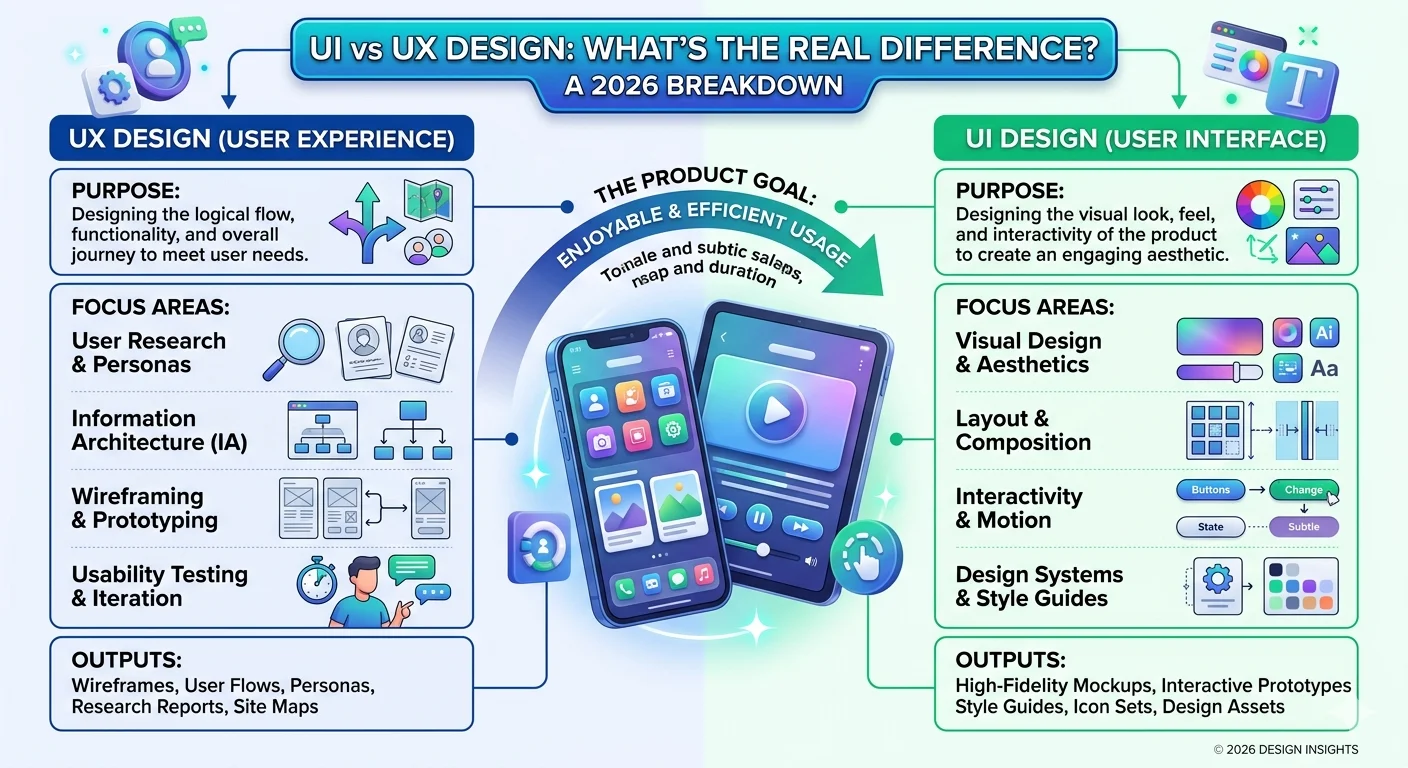
UX is how a product works. UI is how it looks and responds when you touch it.
That's it, genuinely. UX decides where the door goes. UI decides what the door looks like and how satisfying it feels to push it open. You need both, in that order, or the whole thing falls apart - a gorgeous app that nobody can navigate is a UI win and a UX failure, and a beautifully mapped-out flow with ugly, cluttered screens is the opposite problem.
UX Design - The Part Nobody Sees
UX stands for User Experience, and the job is almost entirely invisible if it's done well. A UX designer's actual day-to-day looks less like "designing" in the way most people imagine and more like detective work - talking to users, mapping out how they currently get something done, finding where they get stuck or annoyed, and then redrawing that path so it's shorter and less painful.
Before a single screen gets touched, a UX designer is usually buried in:
- User research: Interviews, surveys, watching real people use a product (or a competitor's) and noting exactly where they hesitate.
- Information architecture: Deciding what goes where - which screen comes after which, what's a tap away versus three taps away.
- Wireframing: Plain, grey-box sketches of every screen with zero colour or styling, purely testing if the logic holds up.
- User flows and journey mapping: Tracing the exact path someone takes from "I have a problem" to "my problem is solved" inside the app.
- Usability testing: Putting the wireframes in front of real people before a single rupee gets spent building it, and watching where they fumble.
None of that involves picking a colour palette or a font. That's the part people miss - a UX designer can do excellent work and hand over something that looks like a black-and-white blueprint, because the job was never about looking good. It was about making sure the thing makes sense.
UI Design - The Part Everyone Notices First
UI stands for User Interface, and this is the half that gets all the credit because it's the half you can actually see. A UI designer takes the skeleton a UX designer built and gives it a face - colours, type, icons, spacing, button states, the little animation when something loads.
A UI designer's toolkit is built around:
- Visual hierarchy: Making sure your eye lands on the right thing first - the "Buy Now" button shouldn't be fighting with the footer for attention.
- Typography and colour systems: Picking type that's readable at every size, and a colour palette that actually means something - red for errors, green for success, consistently, every single screen.
- Design systems and component libraries: Building reusable buttons, cards, and form fields once, properly, so the whole product feels like one product instead of twenty different screens stitched together.
- Micro-interactions: The small stuff - a button that gently depresses when tapped, a field that turns green the instant you type a valid email, a progress bar that actually reflects real progress.
- Responsive and adaptive layouts: Making sure the screen doesn't break or look abandoned on a different phone size or a tablet.
A skilled UI designer can take an average UX flow and make it feel effortless purely through visual clarity. But - and this is the catch - they can't fix a flow that's fundamentally broken. If the checkout process needs eleven steps because nobody mapped it properly, no amount of pretty buttons saves it.
A Comparison You Can Actually Remember
Tables explain this faster than paragraphs do, so here's the side-by-side:
| Aspect | UX Design | UI Design |
|---|---|---|
| Core Question | Does it work? | Does it look and feel right? |
| Main Focus | Structure, logic, user flow | Visuals, typography, interaction |
| Typical Output | Wireframes, flowcharts, research reports | High-fidelity mockups, prototypes, design systems |
| Key Tools | Figma (wireframe mode), Miro, FigJam | Figma, Adobe XD, Illustrator |
| Starts With | The user's problem | The UX designer's wireframe |
| Success Metric | Task completion, drop-off rate | Visual consistency, engagement, delight |
| Analogy | The architect's floor plan | The interior designer's finishing |
That floor-plan analogy genuinely holds up the longer you sit with it. A UX designer decides where the bedroom door goes so it doesn't bang into the wardrobe. A UI designer picks the paint, the door handle, and the light fixture. You'd never hire only one of them to build a house, and a digital product is no different.
Where the Line Gets Blurry in 2026
I'll be honest about something most course brochures won't tell you - the line between UI and UX has been getting blurrier every year, and in 2026 it's blurrier than ever. Most startups and mid-sized companies in India can't afford to hire a dedicated UX researcher, a dedicated UX architect, and a dedicated UI designer separately. They hire one "UI/UX Designer" and expect that person to do a slimmed-down version of both.
A few things are reshaping the role itself right now. Design systems have become the default way teams work, which means a single designer might spend less time drawing individual buttons and more time managing tokens and components that scale across the whole product. AI-assisted design tools can now generate a decent first-pass layout from a prompt or an existing component library, so designers are shifting toward judgment and refinement rather than starting from a blank canvas every time. Voice and conversational interfaces are also pulling UX thinking into places that have no visual screen at all - which is a strange but useful reminder that UX was never really about pixels in the first place.
None of this erases the distinction, though. It just means most working designers in India today are expected to be reasonably fluent in both halves, even if they end up specialising in one as their career grows.
Why This Confusion Actually Hurts Hiring
I've sat in on enough placement interviews to see this go wrong both ways. Companies post a "UI/UX Designer" opening expecting someone who can do research, wireframing, AND polished visual design - basically two specialists' worth of work for one salary. Candidates, meanwhile, walk in with a portfolio full of pretty screens and zero evidence they ever thought about user flow, because nobody told them research and structure were part of the job too.
The candidates who stand out are the ones whose portfolios show both halves clearly - a case study with the messy wireframes and user flow diagrams included, not just the final polished screens. It signals you understand that the pretty screen is the last ten percent of the work, not the whole job.
What Designers Earn in India - UI vs UX
Numbers help more than opinions here, so let's get specific. These are realistic monthly figures for UI and UX roles across India's metros and tier-1 cities in 2026:
| Career Stage | Experience | UI Designer (Monthly) | UX Designer (Monthly) |
|---|---|---|---|
| Fresher | 0–1 Year | ₹18,000 – ₹28,000 | ₹20,000 – ₹30,000 |
| Junior Designer | 1–3 Years | ₹28,000 – ₹48,000 | ₹32,000 – ₹52,000 |
| Mid-Level Designer | 3–5 Years | ₹48,000 – ₹75,000 | ₹55,000 – ₹85,000 |
| Senior Designer | 5+ Years | ₹75,000 – ₹1,20,000+ | ₹90,000 – ₹1,40,000+ |
| Lead / Principal | 8+ Years | ₹1,10,000 – ₹1,70,000+ | ₹1,30,000 – ₹2,00,000+ |
UX roles tend to edge ahead at the senior level, mostly because there are fewer designers who are genuinely good at research and strategy compared to the number who can produce clean visuals. That's not a knock on UI designers - it's just supply and demand. Companies that scale fast and need someone shaping product decisions, not just screens, will pay for that judgment.
Real Indian Products Worth Studying
You don't need a foreign case study to understand good UX - some of the sharpest design thinking right now is sitting on your own phone. Payment apps like PhonePe and Paytm had to solve UX problems most Western products never face - users with patchy network connections, multiple regional languages, and a healthy distrust of anything that looks even slightly off when money's involved. That's UX-first thinking, solving a trust and clarity problem before any visual polish happens.
Ride-hailing and delivery apps built for Indian traffic patterns, multiple drop pins, and cash-on-delivery options are doing the same thing - adapting structure to real local behaviour, not copy-pasting a template built for a different market. If you're building a portfolio, studying how these apps handle their trickiest flows - the first transaction, the failed payment retry, the address that doesn't quite match the map pin - will teach you more about UX than ten generic tutorials.
Which One Should You Actually Pick?
Honestly, neither - not as an either/or, not at the start. Every solid UI/UX design course in Pune worth its fees will teach you both halves before you specialise, because you genuinely can't design a good interface without understanding the experience it's sitting inside of, and you can't validate a user flow without knowing how it'll actually render on screen.
That said, a few honest signals can point you toward where you'll lean naturally:
- Lean UX if you enjoy asking "why" more than "how it looks" - if you'd rather interview five users about their frustration than pick a font for an hour.
- Lean UI if you have a strong, instinctive sense for visual balance - if you notice misaligned spacing in apps you didn't even design, unprompted.
- Stay a generalist if you're early in your career and want maximum flexibility - most first jobs in India still expect both, and specialising too early can box you in before you've even tried the other side.
The designers who go furthest, in my experience, are the ones who picked up real fluency in both before deciding where to specialise - not the ones who picked a lane in month one and never looked at the other half again.
Skills Worth Building for Either Path
Regardless of which side you eventually lean toward, a few skills show up on every serious job listing right now:
- Figma: The industry default for both wireframing and high-fidelity UI work - if you only learn one tool properly, make it this one.
- Basic user research methods: Even a UI-leaning designer who can run a simple five-user usability test stands out immediately in interviews.
- Design systems thinking: Understanding components, tokens, and reusable patterns - this is how real product teams work now, not one-off screens.
- Prototyping: Being able to click through a realistic, interactive version of your design before any code gets written, so flaws surface early.
- Accessibility basics: Colour contrast, readable type sizes, keyboard navigation - increasingly a baseline expectation, not a nice-to-have, on Indian and international projects alike.
The Honest Bottom Line
UI and UX aren't competing terms, and they're definitely not interchangeable ones. UX is the thinking that happens before anything looks like anything - the research, the structure, the flow that makes a product actually usable. UI is what turns that structure into something a person actually wants to touch, look at, and trust.
Get good at understanding both, even if you eventually specialise in just one, and you'll never be the designer staring blankly when an interviewer asks you to explain the difference - because by then, you'll have lived it.
 Enquire Now